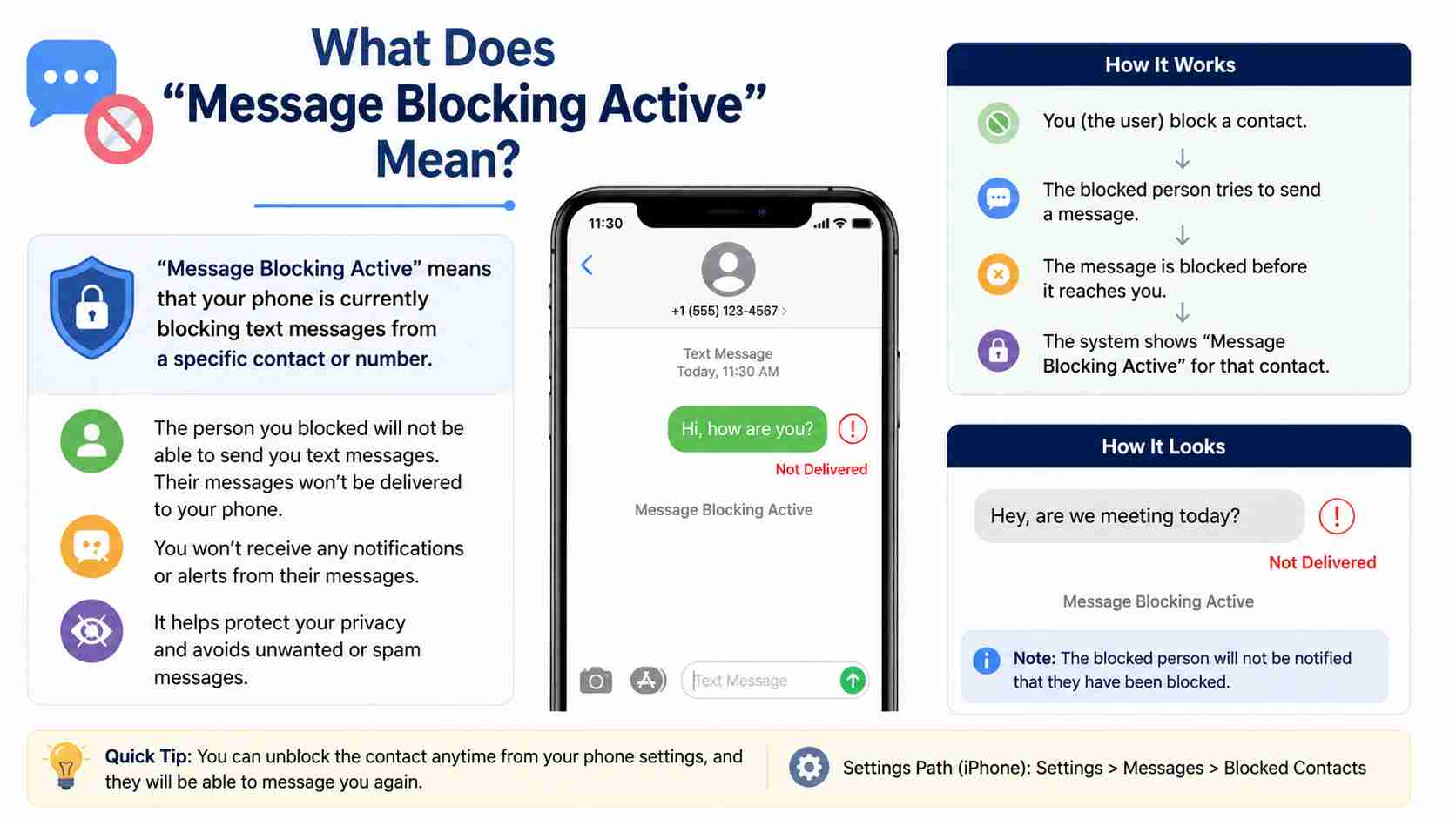
Have you ever tried sending a text message and suddenly seen a notification saying “Message Blocking Active”? This message can be confusing because it does not clearly explain what went wrong or how to fix it.
The phrase “message blocking active” usually means your phone carrier, device settings, or messaging app is preventing a message from being sent or received. It does not always mean that someone blocked you personally. Many users misunderstand this alert and assume the other person has blocked their number, but the actual reason is often related to account settings, network issues, or blocked messaging services.
In this complete guide, you will learn what does message blocking active mean, why it happens, how to fix it on Android and iPhone, and how to prevent it from happening again.
What Does Message Blocking Active Mean?
- Message Blocking Active means your text message service is currently restricted.
- Your phone is unable to send or receive certain messages.
- The restriction can come from your mobile carrier.
- It may happen because of account settings.
- It does not always mean someone blocked your number.
- The error usually appears when sending SMS or MMS.
- Your carrier may have activated a messaging restriction.
- A blocked contact can also create similar problems.
- Incorrect phone settings may cause this issue.
- The message appears when the network refuses delivery.
- It can affect Android and iPhone users.
- Some users see it after changing SIM cards.
- It may happen after switching mobile plans.
- Temporary network problems can trigger the message.
- Parental controls can also block messages.
- Premium messaging restrictions may cause this error.
- The issue may affect only certain numbers.
- It can usually be fixed without replacing your phone.
- Restarting your device may solve temporary problems.
- Checking your carrier settings is often necessary.
Main Reasons Why Message Blocking Active Appears
- Your phone number may have outgoing message restrictions.
- Your carrier may have blocked SMS services.
- Your account balance may be insufficient.
- Your messaging plan may not support certain messages.
- The recipient number may be blocked.
- Your phone may have incorrect network settings.
- SIM card problems may interrupt messaging.
- Airplane mode may be accidentally enabled.
- Your messaging app may have errors.
- Spam protection may block your messages.
- Your carrier may detect unusual messaging activity.
- International messaging may be disabled.
- MMS settings may be incorrect.
- Your phone software may need an update.
- The contact information may be saved incorrectly.
- Your account may have temporary restrictions.
- Your device may have a network registration issue.
- The carrier network may be experiencing downtime.
- You may have enabled message blocking accidentally.
- Third-party apps may interfere with messaging.
Does Message Blocking Active Mean Someone Blocked You?
- Many people think this message means another person blocked them.
- In most cases, it does not mean that.
- Carrier restrictions are a common reason.
- Your own phone settings can create the problem.
- The other person may still receive messages from others.
- You should check your messaging settings first.
- Try sending a message to another contact.
- If all messages fail, it is likely your account issue.
- If only one person fails, they may have blocked you.
- Network errors can look like blocking problems.
- The notification alone cannot confirm personal blocking.
- Your carrier controls many messaging restrictions.
- Phone updates can sometimes create messaging errors.
- Checking your account is the best first step.
- Restarting your phone can refresh the connection.
- Testing another SIM can help identify the cause.
- Contact blocking and message blocking are different things.
- The error is usually technical.
- Do not assume someone blocked you immediately.
- Multiple reasons can create the same message.
How to Fix Message Blocking Active on Android
- Restart your Android phone.
- Check if your SIM card is working properly.
- Turn airplane mode on and off.
- Check your message app permissions.
- Clear your messaging app cache.
- Update your Android software.
- Update your messaging application.
- Remove and reinsert your SIM card.
- Check your carrier message settings.
- Make sure your phone number is active.
- Disable spam protection temporarily.
- Check blocked contacts list.
- Remove the contact and save it again.
- Reset network settings.
- Check your SMS center number.
- Turn off battery-saving restrictions.
- Try using another messaging app.
- Contact your mobile carrier.
- Check your mobile plan status.
- Factory reset only as a last option.
How to Fix Message Blocking Active on iPhone
- Restart your iPhone device.
- Check your cellular connection.
- Turn iMessage off and on.
- Check blocked contacts in settings.
- Update iOS software.
- Check SMS settings.
- Enable Send as SMS option.
- Remove and reinstall the SIM card.
- Reset network settings.
- Check carrier updates.
- Sign out and back into iMessage.
- Check Apple ID settings.
- Disable message filtering temporarily.
- Make sure your phone number is activated.
- Contact your carrier support.
- Test sending messages to another person.
- Check if your plan supports texting.
- Turn cellular data on for MMS.
- Restart after changing settings.
- Check for iPhone software bugs.
How to Fix Message Blocking Active on T-Mobile
- Check your T-Mobile account status.
- Make sure texting services are enabled.
- Review message blocking settings.
- Contact T-Mobile customer support.
- Restart your phone after account changes.
- Check your prepaid balance.
- Remove blocked numbers.
- Update carrier settings.
- Verify your SIM card connection.
- Check international messaging options.
- Disable spam blocking features temporarily.
- Confirm your phone number is active.
- Reset your network connection.
- Try another messaging app.
- Check if your account has restrictions.
- Ask support to remove message blocks.
- Update your phone software.
- Test SMS after changes.
- Check MMS configuration.
- Reconnect to the mobile network.
How to Fix Message Blocking Active on Other Networks
- Contact your mobile provider.
- Check your account restrictions.
- Verify your texting package.
- Confirm your SIM activation.
- Review blocked services.
- Check network availability.
- Update carrier settings.
- Restart your device.
- Reset network settings.
- Remove unwanted restrictions.
- Check your phone compatibility.
- Confirm messaging permissions.
- Test your SIM card.
- Try another device.
- Check your billing status.
- Update your operating system.
- Remove blocked contacts.
- Disable security apps temporarily.
- Ask support for account review.
- Follow carrier troubleshooting steps.
Message Blocking Active When Sending to One Person
- Check if that person’s number is correct.
- Remove and save the contact again.
- Check your blocked list.
- Ask the person if they changed numbers.
- Try calling the person.
- Send a message from another phone.
- Check if they blocked your number.
- Verify country code if international.
- Restart your phone.
- Clear your messaging app data.
- Try sending a simple text.
- Avoid sending large media files.
- Check MMS compatibility.
- Update your contacts.
- Disable spam filters.
- Test another messaging service.
- Confirm your carrier allows messaging.
- Wait and try again later.
- Check for network problems.
- Contact support if the issue continues.
Message Blocking Active for iPhone and Android Users
- Both systems can experience this error.
- The cause is often the mobile carrier.
- Device settings can also create restrictions.
- Software updates may affect messaging.
- SIM problems can happen on both platforms.
- Network resets help many users.
- Messaging apps may require updates.
- Account restrictions affect both devices.
- Carrier settings are important.
- Blocked contacts work differently on each phone.
- Restarting solves temporary issues.
- Internet messaging and SMS are different.
- MMS requires proper settings.
- iMessage has separate settings.
- Android messaging apps vary by brand.
- Checking permissions can help.
- Account verification may be needed.
- Carrier support can identify restrictions.
- Changing phones does not always fix it.
- The solution depends on the cause.
How to Prevent Message Blocking Active Problems
- Keep your phone software updated.
- Maintain an active mobile plan.
- Check account restrictions regularly.
- Avoid sending excessive spam messages.
- Keep messaging apps updated.
- Save contacts correctly.
- Avoid blocking important numbers accidentally.
- Restart your phone occasionally.
- Keep SIM cards in good condition.
- Use official messaging apps.
- Review privacy settings.
- Check carrier notifications.
- Maintain enough account balance.
- Avoid suspicious third-party apps.
- Update carrier settings.
- Use correct international formats.
- Monitor unusual account activity.
- Keep network settings normal.
- Contact your carrier early.
- Backup important contacts.
FAQs
What does message blocking active mean?
Message blocking active means your device or carrier is preventing a text message from being sent or received. It is usually caused by account restrictions, settings, or network issues.
Does message blocking active mean I am blocked?
No. It does not always mean someone blocked you. It can be caused by your carrier, phone settings, or messaging problems.
Why does my phone say message blocking active when texting?
Your phone may show this message because SMS service is restricted, your account has limitations, or your messaging settings are incorrect.
How do I remove message blocking active?
Restart your phone, check your carrier settings, remove blocked contacts, reset network settings, and contact your carrier if needed.
Can a SIM card cause message blocking active?
Yes. A damaged or incorrectly activated SIM card can stop messages from working properly.
Conclusion
Understanding what does message blocking active mean helps you solve the problem without unnecessary worry. This message does not always mean someone blocked you. In many situations, it is simply caused by carrier restrictions, account settings, SIM problems, or phone configuration issues.
By checking your messaging settings, restarting your device, updating software, and contacting your carrier when needed, you can usually fix the issue quickly. you use Android or iPhone, the right troubleshooting steps can restore your messaging service and prevent the problem from happening again.