Sending a text message and noticing that it doesn’t say delivered can instantly create confusion, stress, or even anxiety. Whether you’re texting a friend, family member, coworker, or someone important, the missing “Delivered” status often makes people wonder what went wrong.
Did the person block you? Is their phone turned off? Is there a network issue? Or is the messaging app simply having problems?
The truth is that there are many reasons why a message doesn’t say delivered, and most of them are completely normal. In this detailed guide, you’ll learn exactly what it means when a message stays undelivered, the common causes behind it, how different apps handle delivery statuses, and the best ways to fix the problem quickly.
This article is written in simple English so anyone can understand the issue without technical confusion.
What Does “Message Doesn’t Say Delivered” Mean?
- The message may not have reached the recipient yet.
- The recipient’s phone could be turned off.
- Internet connection issues may interrupt delivery.
- Messaging servers sometimes experience delays.
- The recipient may have airplane mode enabled.
- Poor signal strength can block message delivery.
- Some apps temporarily stop syncing messages.
- The recipient may not have data or WiFi access.
- Your own network connection may be unstable.
- The messaging app could be outdated.
- The phone number may no longer be active.
- Delivery receipts might be disabled.
- Some platforms do not always show delivery status instantly.
- The message could still be processing in the background.
- Server maintenance may delay message confirmation.
- The recipient might have blocked notifications.
- Large attachments can slow message delivery.
- Privacy settings sometimes hide delivery updates.
- Device software bugs can interrupt messaging systems.
- Most delivery problems are temporary and fixable.
Common Reasons Why a Message Doesn’t Say Delivered
- Weak mobile network connection.
- Internet outage on either device.
- Recipient’s phone battery is dead.
- Airplane mode is turned on.
- Messaging app servers are down.
- SIM card issues may interrupt service.
- WiFi disconnects during message sending.
- The recipient blocked your number.
- Incorrect phone number entered.
- Old app versions causing glitches.
- Device storage full on either phone.
- Background app restrictions affecting messages.
- VPN interference with messaging apps.
- iMessage activation problems.
- Android messaging sync errors.
- Carrier-related technical issues.
- Delayed server processing.
- Expired messaging sessions.
- Security settings blocking communication.
- Temporary software bugs in the app.
Why iPhone Messages Don’t Say Delivered
- iMessage requires internet access to work properly.
- Apple servers may experience temporary issues.
- The recipient’s iPhone may be offline.
- iMessage could be disabled accidentally.
- The phone may not be connected to WiFi.
- Cellular data might be turned off.
- Airplane mode can stop delivery confirmation.
- Apple ID syncing issues may interrupt messaging.
- The recipient may have blocked your number.
- The iPhone may need a software update.
- Storage issues can affect iMessage performance.
- SIM card errors may interrupt delivery.
- Date and time settings may be incorrect.
- VPN apps sometimes interfere with iMessage.
- Network settings might need resetting.
- The recipient switched from iPhone to Android.
- iMessage activation may fail temporarily.
- Large photos or videos can delay delivery.
- Background refresh settings may be disabled.
- Restarting the iPhone often fixes the issue.
Why Android Messages Don’t Say Delivered
- Android messaging apps vary by manufacturer.
- RCS chat features may not be active.
- Mobile data may be turned off.
- Weak signal strength interrupts message delivery.
- Messaging apps can freeze temporarily.
- SIM card problems may affect texting.
- Cached app files may become corrupted.
- The recipient’s phone may be offline.
- Google Messages servers may experience delays.
- Battery saver mode can block app syncing.
- Background data restrictions may affect delivery.
- Android updates sometimes create bugs.
- WiFi calling conflicts can occur.
- Messaging permissions may be disabled.
- Old app versions can cause failures.
- Carrier outages may interrupt texting.
- VPN services can create connection problems.
- Device storage shortages affect app performance.
- Restarting the phone can refresh the system.
- Reinstalling the messaging app may help.
Does It Mean Someone Blocked You?
- Not always, because many other issues exist.
- Network problems are more common than blocking.
- A powered-off phone prevents delivery updates.
- Delivery receipts can be disabled manually.
- Messaging apps handle blocks differently.
- Some apps hide delivery information intentionally.
- The recipient may simply have no internet access.
- Server outages can delay message confirmation.
- Phone software glitches may interrupt updates.
- The recipient could be traveling without service.
- Privacy settings sometimes stop delivery receipts.
- Temporary account restrictions may occur.
- Messages may send later automatically.
- Some carriers delay SMS confirmations.
- Group chats may behave differently.
- Blocking usually causes repeated delivery failures.
- Calls going directly to voicemail may indicate blocking.
- Profile pictures disappearing can suggest restrictions.
- Read receipts are separate from delivery status.
- One missing “Delivered” notice does not guarantee blocking.
How to Fix a Message That Doesn’t Say Delivered
- Check your internet connection first.
- Turn airplane mode off and on again.
- Restart your phone completely.
- Update your messaging app immediately.
- Switch between WiFi and mobile data.
- Verify the recipient’s phone number carefully.
- Check if messaging servers are down.
- Disable VPN apps temporarily.
- Clear messaging app cache files.
- Log out and back into the app.
- Turn iMessage or RCS off and on.
- Reset network settings on your device.
- Update your phone software.
- Remove large attachments before resending.
- Ensure background app refresh is enabled.
- Check SIM card placement properly.
- Free storage space on your phone.
- Reinstall the messaging application.
- Try sending a simple text only.
- Wait a few minutes for delayed syncing.
Why Instagram Messages Don’t Say Delivered
- Instagram servers may experience delays.
- The recipient may not follow you back.
- Internet connection problems affect DMs.
- The user may have deactivated their account.
- Instagram app bugs can interrupt messaging.
- Account restrictions may limit communication.
- Message requests behave differently than normal chats.
- The recipient may have blocked you.
- Outdated Instagram versions cause glitches.
- Background app restrictions stop syncing.
- VPN usage may affect Instagram connectivity.
- Device cache overload may create issues.
- Instagram maintenance can delay delivery.
- The recipient may have disabled notifications.
- Spam filters sometimes delay messages.
- Large media files take longer to process.
- Temporary login issues may interrupt chats.
- Poor mobile signal affects DM performance.
- Reinstalling Instagram often solves bugs.
- Restarting the app can refresh message status.
Why Facebook Messenger Messages Don’t Say Delivered
- Messenger requires active internet connections.
- Facebook servers sometimes face outages.
- The recipient may have ignored the message request.
- Privacy settings can affect delivery visibility.
- Messenger cache files may be corrupted.
- Outdated apps create syncing issues.
- Airplane mode blocks Messenger connectivity.
- VPN conflicts may interrupt messaging.
- Device software bugs affect app performance.
- The recipient may have blocked you.
- Background restrictions stop real-time syncing.
- Facebook account problems may exist.
- Large media attachments delay sending.
- Messenger Lite works differently sometimes.
- The recipient’s device may be offline.
- Data saver mode may limit syncing.
- Multiple logged-in devices create delays.
- Clearing app cache often fixes issues.
- Restarting the device refreshes Messenger services.
- Server maintenance can temporarily stop delivery updates.
Why WhatsApp Messages Don’t Say Delivered
- WhatsApp depends heavily on internet connectivity.
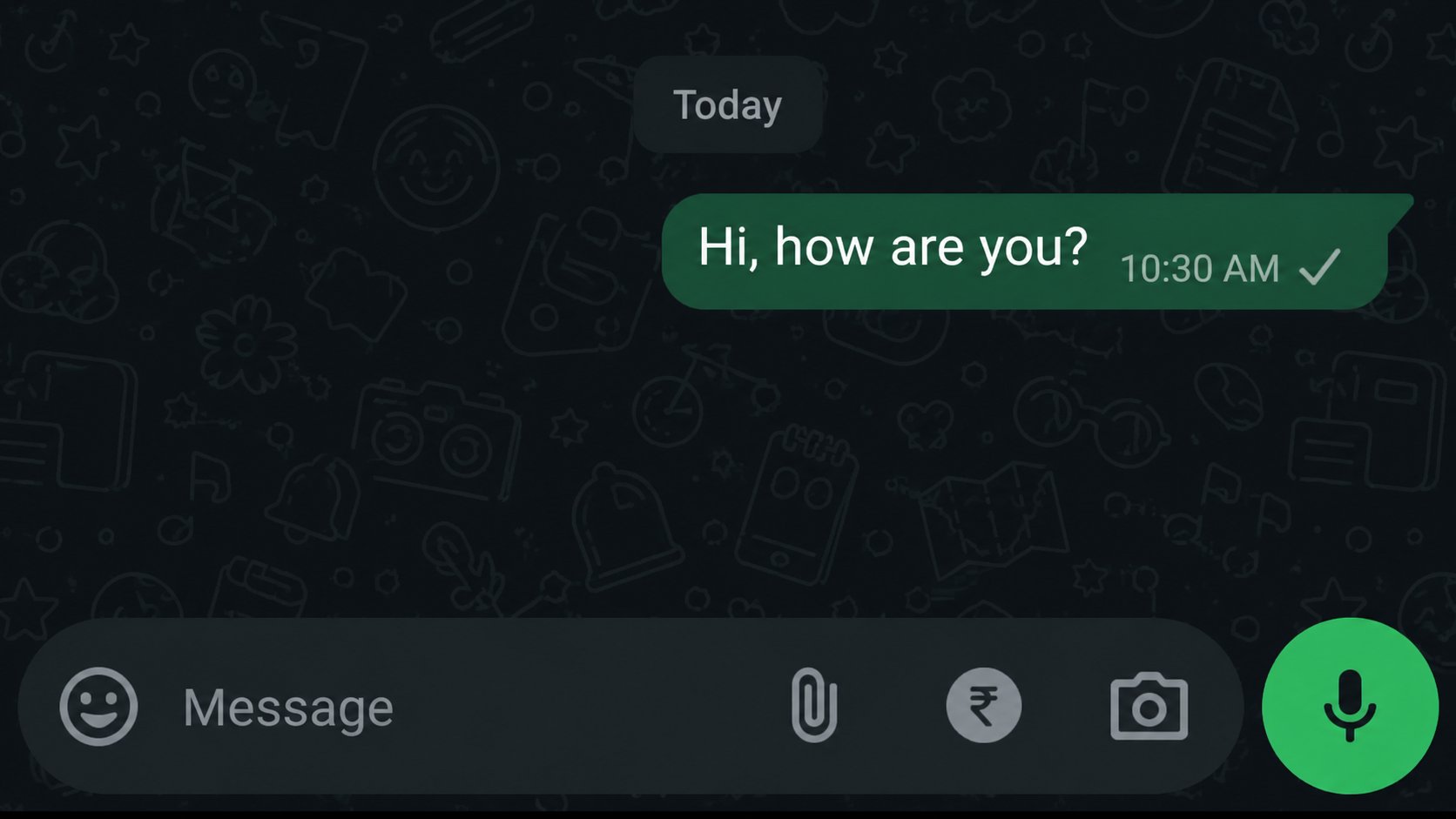
- Single gray check means message sent only.
- Double gray checks mean delivered successfully.
- The recipient’s phone may be turned off.
- Internet outages stop WhatsApp syncing.
- WhatsApp servers occasionally experience downtime.
- Privacy settings may hide online activity.
- The recipient may have blocked your account.
- Old app versions create delivery bugs.
- Battery saver mode affects background syncing.
- WiFi problems interrupt delivery updates.
- VPN apps may interfere with WhatsApp.
- Device storage shortages slow performance.
- Reinstalling WhatsApp may solve the issue.
- Large video files delay processing.
- The recipient may have no signal.
- Data restrictions block app activity.
- Group messages behave differently sometimes.
- Restarting the app refreshes message delivery.
- Delayed double checks often resolve naturally.
Emotional Reasons People Worry About Undelivered Messages
- People fear they are being ignored.
- Anxiety increases when replies take too long.
- Relationship misunderstandings can happen easily.
- Lack of delivery confirmation creates uncertainty.
- Many assume blocking immediately.
- Social media increases communication expectations.
- Delayed replies often trigger overthinking.
- Emotional conversations create more stress.
- Romantic relationships are especially affected.
- Friendships sometimes feel strained.
- Work-related messages can create panic.
- Family emergencies increase communication pressure.
- Silence may feel personal even when it isn’t.
- Technology issues are often misunderstood emotionally.
- Many people check delivery status repeatedly.
- Delayed messages can hurt confidence.
- Expectations of instant communication are common today.
- Miscommunication may damage relationships temporarily.
- Overanalyzing message status is very common.
- Most undelivered messages are harmless technical issues.
Signs the Problem Is Technical and Not Personal
- Other apps are also running slowly.
- Your internet connection keeps disconnecting.
- Multiple contacts experience the same issue.
- The messaging app recently updated.
- Downdetector shows server outages.
- Messages eventually deliver after a delay.
- Calls to the person still work normally.
- Social media platforms report widespread problems.
- Restarting the phone improves performance.
- The recipient later replies normally.
- Delivery problems happen randomly.
- WiFi signal appears unstable.
- Messages fail only on one app.
- The recipient posts online normally afterward.
- Other users report identical issues.
- Large files fail more often than text.
- App notifications arrive late generally.
- Device overheating affects app performance.
- Switching networks temporarily fixes the issue.
- Technical glitches are extremely common today.
Best Ways to Prevent Message Delivery Problems
- Keep messaging apps updated regularly.
- Use stable internet connections whenever possible.
- Restart your phone occasionally.
- Clear app cache every few weeks.
- Avoid installing suspicious applications.
- Keep enough free storage space available.
- Update your device software consistently.
- Avoid excessive VPN usage.
- Use official messaging apps only.
- Turn on automatic app updates.
- Check carrier service reliability.
- Monitor battery health regularly.
- Disable unnecessary background restrictions.
- Use strong and stable WiFi networks.
- Remove outdated app files frequently.
- Keep SIM cards clean and secure.
- Avoid sending oversized attachments constantly.
- Enable app permissions correctly.
- Restart routers during internet issues.
- Back up important messages safely.
Advanced Troubleshooting for Messages Not Saying Delivered
- Reset network settings completely.
- Reinsert the SIM card carefully.
- Test messaging on another device.
- Check carrier outage reports online.
- Use safe mode for troubleshooting.
- Inspect app permissions manually.
- Reset messaging app preferences.
- Clear system cache partitions.
- Disable battery optimization for messaging apps.
- Try a different messaging platform temporarily.
- Contact your mobile carrier for support.
- Restore factory settings as a last resort.
- Check APN settings carefully.
- Monitor background data usage.
- Run device diagnostic tools.
- Disable experimental app features.
- Test with another SIM card.
- Review privacy and security settings.
- Use official app versions from trusted stores.
- Contact app support if issues continue.
FAQs
Why does my message not say delivered?
This usually happens because of internet issues, phone settings, server delays, or temporary app glitches. In some cases, the recipient’s phone may simply be offline.
Does not delivered mean blocked?
Not always. While blocking is one possible reason, poor network connections and technical problems are much more common causes.
How long can a message stay undelivered?
Messages may remain undelivered for a few minutes, hours, or until the recipient reconnects to the internet or turns their phone back on.
Why do iPhone messages sometimes not say delivered?
iPhone messages depend on iMessage servers and internet connectivity. If either device loses connection, delivery status may not appear immediately.
Can airplane mode stop message delivery?
Yes, airplane mode disables network connections, preventing messages from being delivered until the device reconnects.
Conclusion
When a message doesn’t say delivered, it can feel confusing and emotionally stressful, especially in important conversations. However, most delivery issues are caused by normal technical problems like poor internet connections, app glitches, outdated software, or temporary server outages.
Whether you use iPhone, Android, WhatsApp, Instagram, or Facebook Messenger, the solutions are often simple. Restarting your phone, updating apps, clearing cache, or checking your network can quickly solve the issue.
Instead of immediately assuming the worst, remember that modern messaging systems are complex and delays happen frequently. In most cases, the message eventually delivers successfully once the connection or server issue is resolved.